
Patterns And Screen Examples
An OP-1 screen can help explain how an instrument sounds and responds. Each pattern below starts with a stock screen, then applies its lesson to an original instrument idea. The example images use original artwork rendered with the bundled Iosevka placeholder. Iosevka and its open licence are included. No stock font resources are served. Check native text fit separately with your own local stock font.
Stock Synth Screens · Mechanisms · Diagrams · Type And Alignment · Motion
For overview/detail, browser hierarchy, edit focus, Shift presentations and routing, see Stock Interaction Patterns.
Stock Synth Screens
The synth engines use different visual explanations for different sound models. FM, String and Digital show three useful approaches. Each reference below has a specific purpose: study how the screen communicates, then give a new instrument its own drawing. The manual illustrations show a composition, not every state or animation of the running firmware.
FM: Put Values Inside The Structure
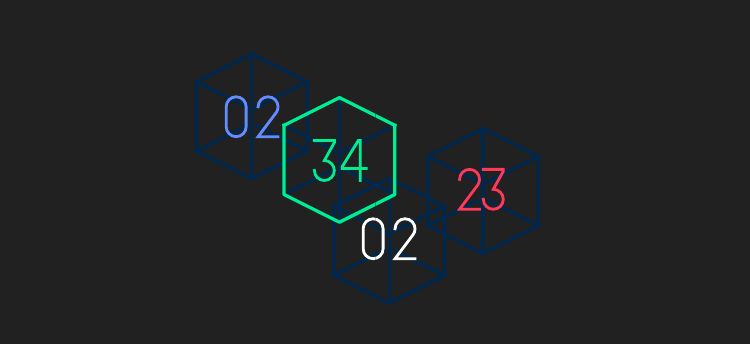
What to notice: four outlined blocks form one spatial composition. Large coloured numerals sit inside those blocks, so the readout belongs to the object rather than a separate dashboard. The dark outlines give the bright numbers room to lead. There is little supporting text inside the screen illustration.
Use the relationship for an instrument built from interacting operators, resonators or stages. Put a value inside an object when that object clearly owns the value. Leave an interior margin and keep connecting lines and changing geometry clear of the lettering. Text inside a purposeful information region is different from text obscuring a curve or moving part.
Carry forward: a recognisable arrangement, embedded readouts and contrast between structure and values. Choose your own objects and arrangement. Do not assume every colour in the artwork is a literal signal connection or infer a runtime routing graph from this static illustration.
String: Make A Sound Model Tangible
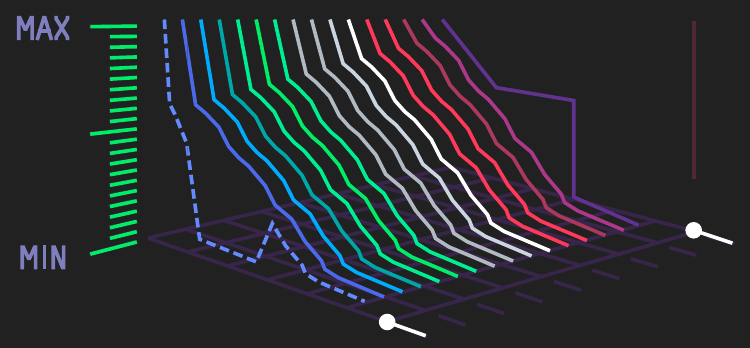
What to notice: a bank of coloured curves sits in a shared perspective frame. The frame, end markers and MIN/MAX scale give the curves a stable place to be read. The illustration carries most of the explanation, with a few short reference labels rather than a row of unrelated numbers.
Use the relationship for physical models, resonators and other instruments whose behaviour is easier to understand as tension, excitation or stored energy. Give the drawing a stable frame of reference. A response can move within it while the camera, labels and control anchors remain steady. In a new instrument, multiple curves can also express a family of related states without requiring continuous animation.
Carry forward: a coherent physical model, shared geometry and restrained labels. The manual image alone does not establish which curves move, their update rate or the renderer’s cost. Membrane uses this broader idea of a stable instrument object with meaningful control features; it is an original application, not a reconstruction of String.
Digital: Let A Sparse Graphic Carry The Identity
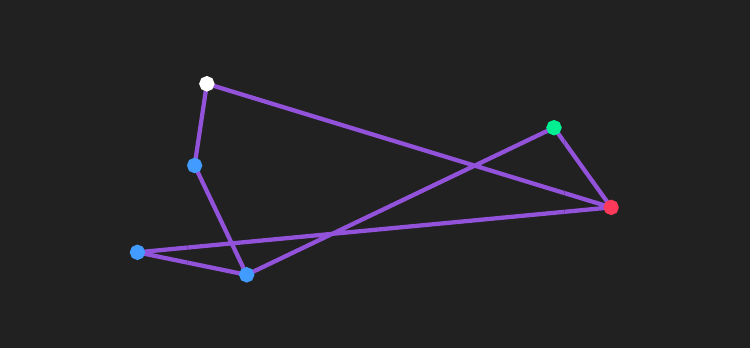
What to notice: a connected geometric figure occupies the centre of a largely empty screen. Most connections share one quieter colour, while a few coloured anchor points draw attention. The silhouette and the spacing between points provide the screen’s identity without four permanent parameter panels.
Use the relationship for an instrument whose controls change a small set of related points or shapes. Give the graphic enough empty space to remain recognisable as it changes. Use a bright control point when it communicates ownership or state, rather than colouring every line equally. Add a precise readout only where it helps the player make a useful decision.
Carry forward: a strong silhouette, selective colour and purposeful empty space. Define what the points and connections mean in the new instrument; the drawing alone does not establish a signal graph, control mapping or animation. An original constellation or mechanism can use the same economy without copying Digital’s geometry.
These references deliberately show different compositions. FM integrates values into objects; String gives a physical model a spatial frame; Digital lets a sparse geometric figure carry the screen’s identity. DBOX below adds repeated source groups and a separate shared-control area. A common colour language does not require a common layout.
1. Draw The Instrument As A Mechanism
Stock Composition Study: DBOX
DBOX groups two sound-source sections and gives the mode/filter structure its own strong area. The groups help the player distinguish each source and its controls from the shared mode and filter. The same control colours repeat within each source row. Colour identifies the control role, while grouping and row numbers identify the source.
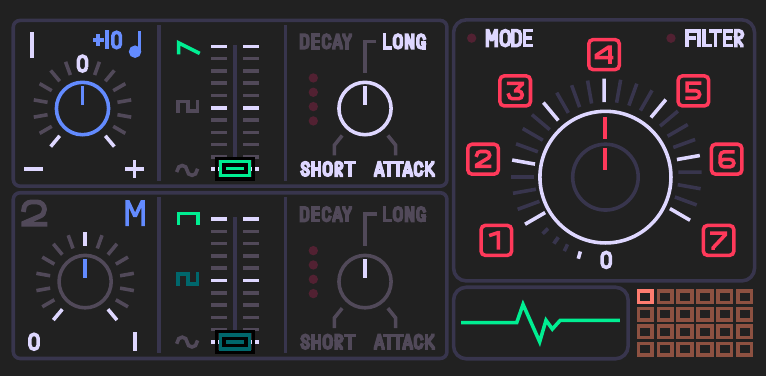
Read the stock composition: the two source rows are distinct; control roles repeat within each row; the shared mode/filter area has its own visual centre. The dim secondary source and the brighter active source communicate emphasis. Carry forward those relationships rather than the drawing itself.
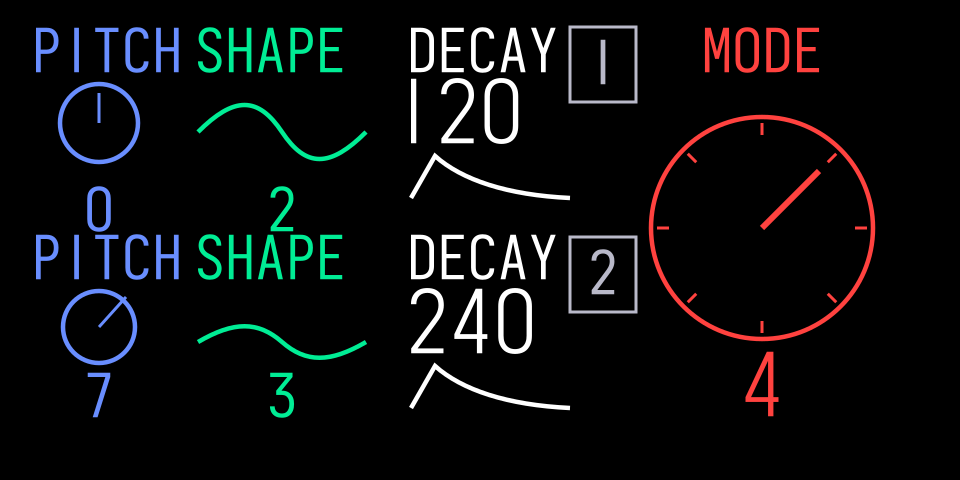
Composition study, not a DBOX replica. Two self-contained source rows occupy the left, each repeating pitch, shape and decay; a separate mode graphic occupies the right. Labels and values are illustrative, not a claim about the stock encoder map.
Use this pattern when several controls belong to one physical or signal structure. Group by that structure, then place readouts near the part they explain. Preserve space around numbers. Do not force a common four-column footer onto every engine.
Reference reading: the original OP-1 manual, §6.7 “DBOX Drum Engine” (PDF page 16 in edition 1.2), and the official original guide.
Original Application: Membrane
One bowl-shaped shell, skin, rim, strike point and felt damping pad form the instrument. The drawing takes most of the screen. Four baseline-aligned readout rows keep names and values apart, with open space between rows. The right-hand panel keeps precision separate from the skin, where a number could obscure the mechanism. Colour connects each readout to a visible feature without adding four panels.
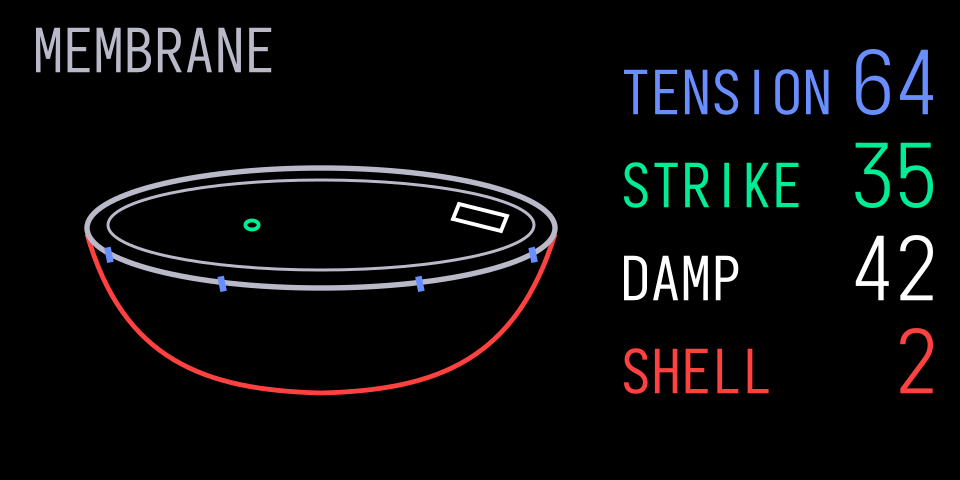
At rest. The shell and rim establish a stable object. The strike and damping contacts are distinct, so their positions can be read without animation.
| Encoder | Proposed Control | Visible Relationship |
|---|---|---|
| Blue | Tension, 0–100 | Exposed length of the small fittings attached to the rim |
| Green | Strike position, 0–100 | A small contact marker on the skin |
| White | Damping, 0–100 | How much skin the felt pad covers near the rim |
| Orange | Shell model, 1–4 | Shell construction marks; model numbers are illustrative |
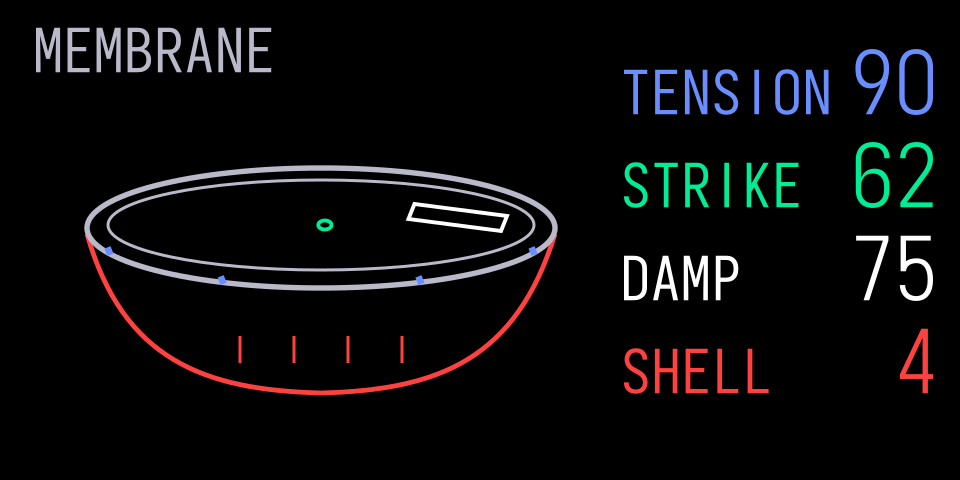
Controls changed. The exposed tension fittings shorten, the strike point moves, the felt pad covers more skin and the shell markings change. The rim, shell outline and viewing angle remain fixed.
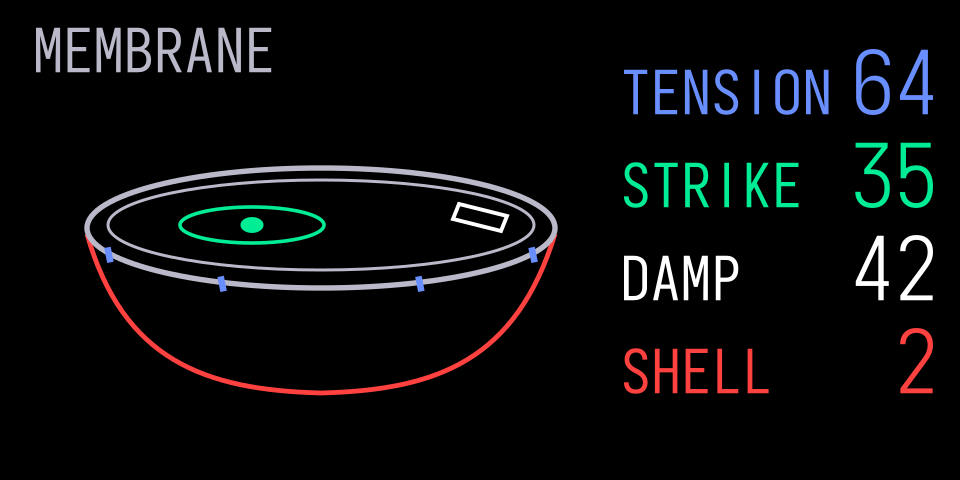
A strike. The contact fills and one local ripple appears on the skin while the control values, shell and readout anchors stay still.
Change one control: Tension Only changes the blue tension hardware, Strike Position Only moves the green contact, and Damping Only increases the white felt pad's coverage without adding a separate arm. Its opaque background hides any response beneath it. The rim and camera remain fixed in every comparison.
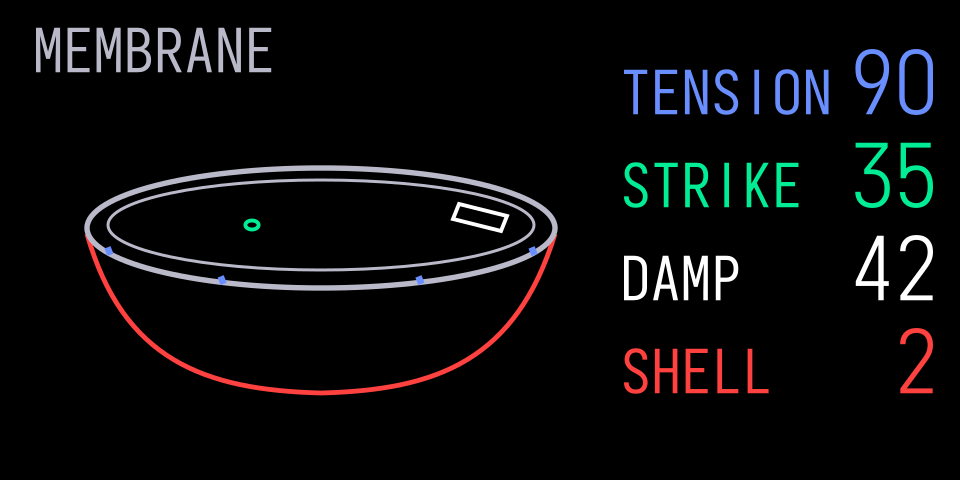
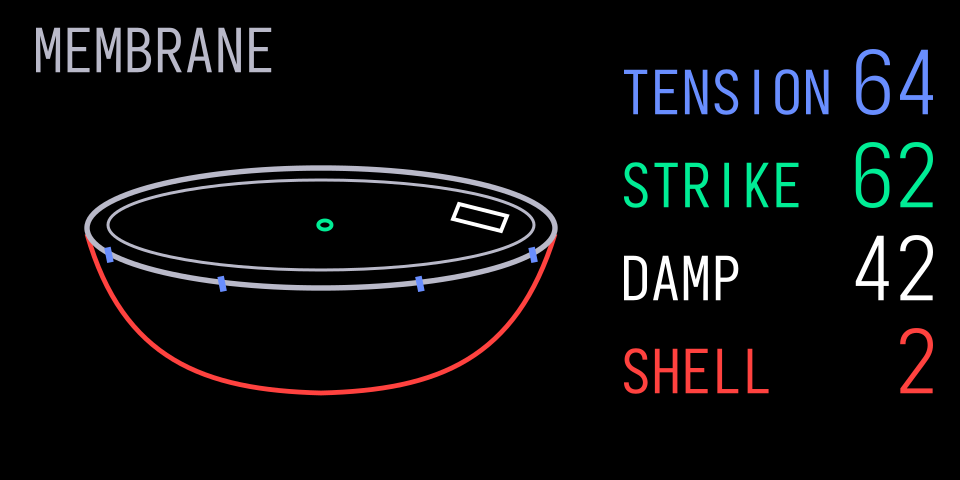
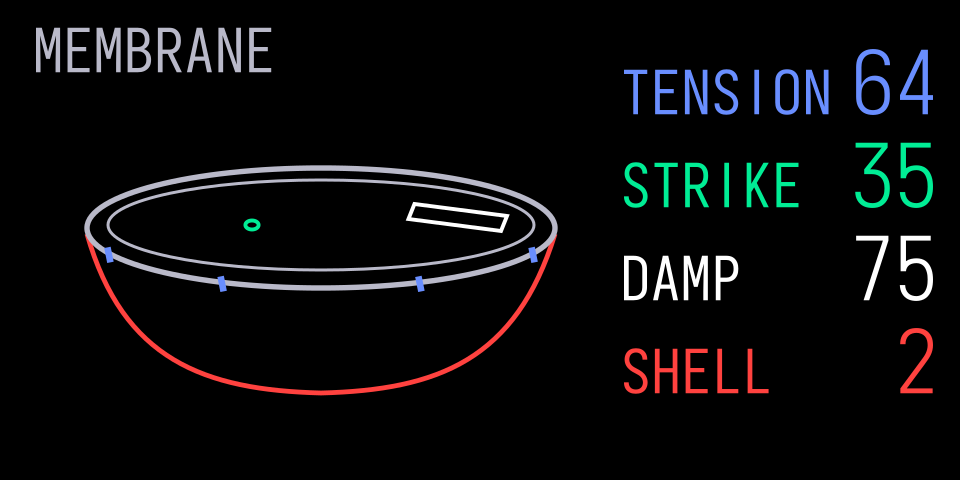
Motion contract: use the strike event to start a short response that settles at rest. Keep the rim and shell fixed. Retain the stable geometry and update control-dependent parts on change; a small set of response poses may be enough. If continuous deformation explains the sound better, measure and bound that work. The static states show the intended relationship, not an implemented animation or a native timing result.
2. Make The Diagram The Control Surface
Stock Composition Study: Synth Envelope
The stock synth envelope gives the shape the screen. Its rise, decay, sustain and release are the explanation, so an illustrated machine would add little. The visual hierarchy comes from the curve, its important points and open space around it. Supporting text should help read the shape without sitting on it.
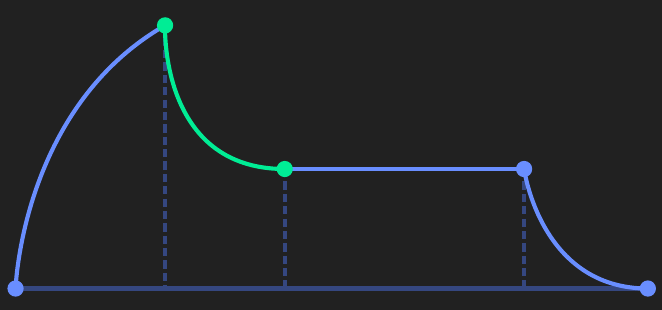
Read the stock composition: the curve dominates; dashed guides and points support it; open space makes its stages easy to distinguish. The manual relates the four stages to the encoders and describes colour feedback when turning them. Our study below adds explanatory text without putting it over the shape.
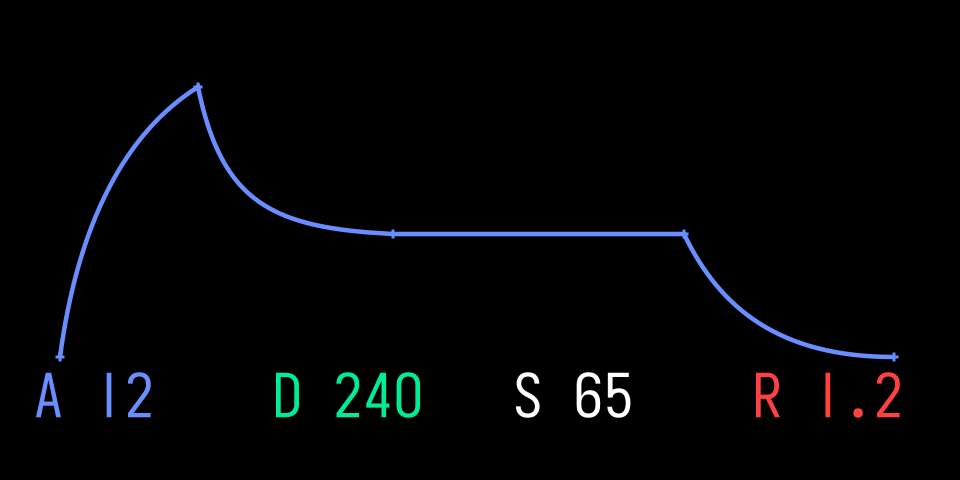
Composition study. A dominant continuous curve and a few handles preserve the relationship between time and level. The A/D/S/R values are an added explanatory layer using the kit’s type roles, not a reconstruction of native readouts or colour mapping.
Use this pattern when a control changes a curve, boundary, route or region directly. Keep a stable reference so the effect of a change is visible. Place names, values and units in clear space beside the graphic. A coloured handle or segment should have an understandable relationship to its encoder.
Reference reading: the original OP-1 manual, §5.3 “Envelope” (PDF page 12 in edition 1.2), and the official original guide.
Original Application: Transient
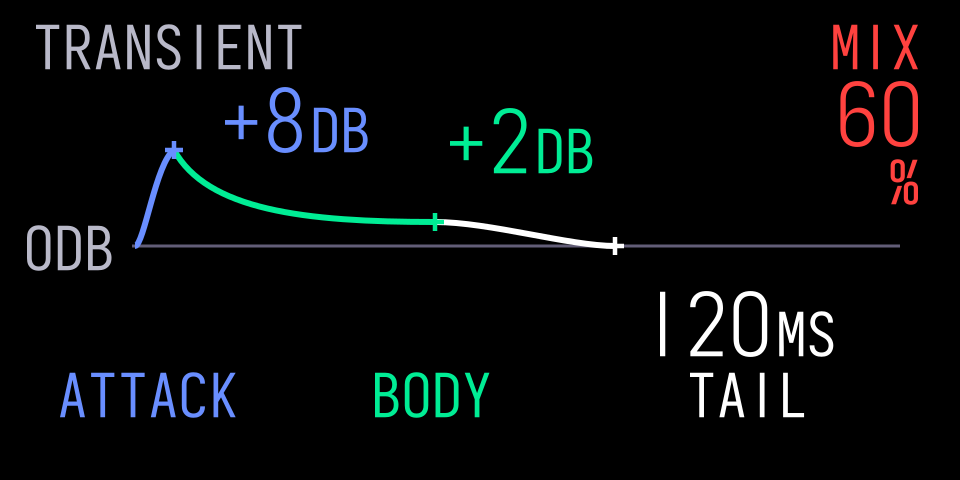
This is an illustrative gain-shaping profile applied to a detected transient, not a measured waveform or an ADSR generator. Attack, body and tail are parts of that profile. Blue, Green and White map to those regions. Orange controls the overall mix and has a separate readout. The graphic leads; supporting numbers sit in the open areas around it. This is a different composition from Membrane because it explains a different kind of instrument behaviour.
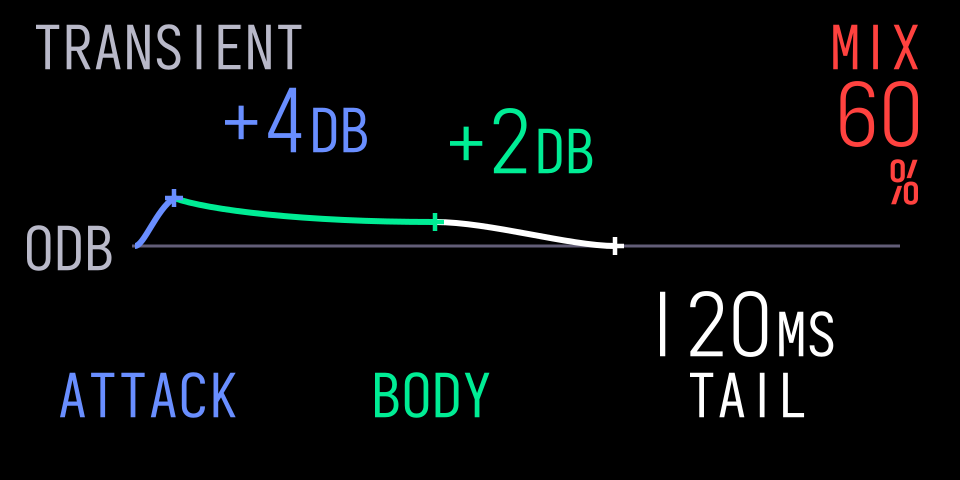
Default shape. Attack and body use dB, tail uses milliseconds and mix uses percent. Values and units share a baseline.
| Encoder | Proposed Control | Visible Relationship |
|---|---|---|
| Blue | Attack gain, −12 to +12 dB | Height of the initial peak |
| Green | Body gain, −12 to +12 dB | Level after the initial peak |
| White | Tail, 20–300 ms | Time for the tail to return to neutral gain |
| Orange | Mix, 0–100% | Blend amount, shown separately from the shape controls |
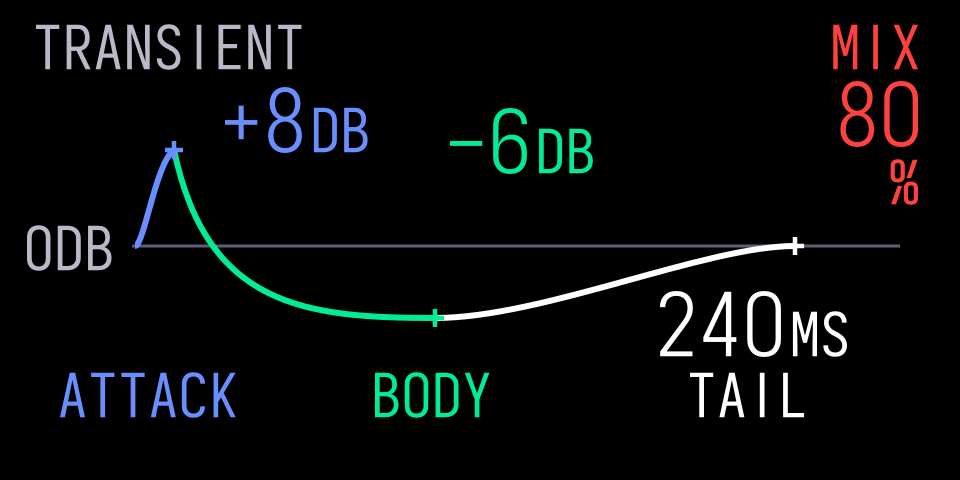
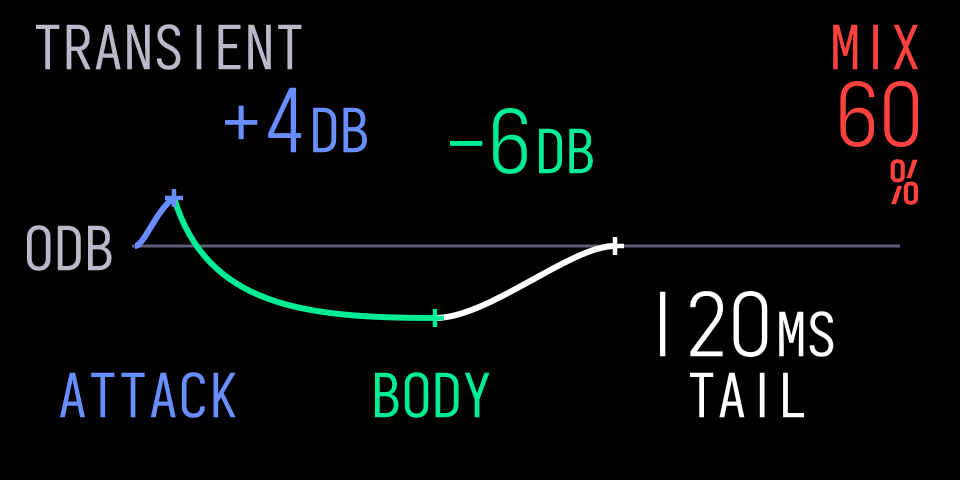
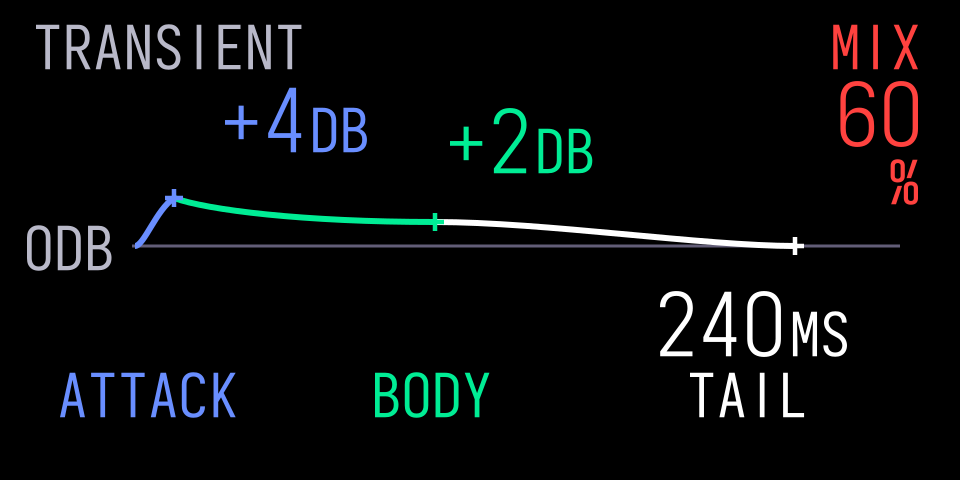
Controls changed. A stronger attack rises above neutral, a lower body falls below it and a longer tail takes more time to return to neutral. The text moves neither onto the curve nor with the handles.
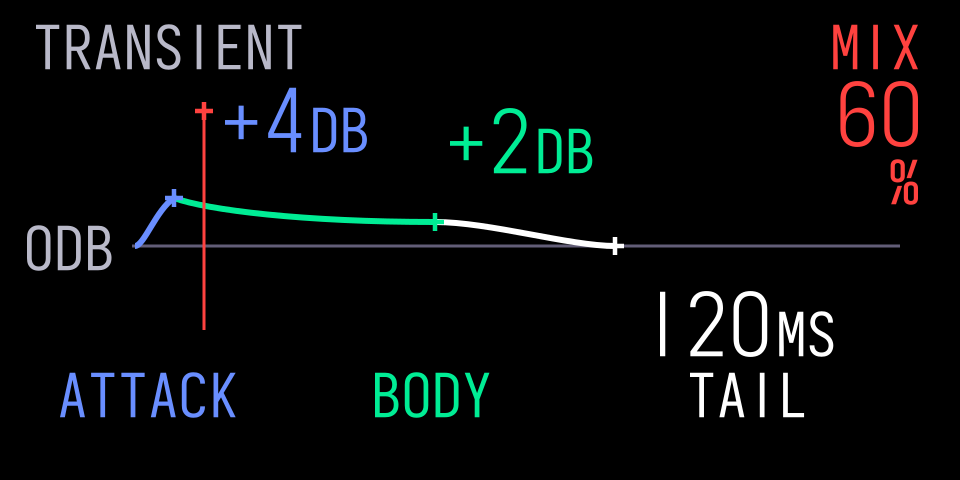
Musical event. A separate marker can show progress through the profile while the configured curve and values stay stable.
The horizontal reference is 0 dB. Positive gain sits above it and negative gain below it, at 4 logical units per dB. Tail uses a linear 0.5 logical units per millisecond from the body anchor: 120 ms spans 60 units and 240 ms spans 120 units. This is a documented drawing scale, not a measured DSP response.
Change one control: Attack Only raises the peak, Body Only moves the body below neutral, and Tail Only doubles its horizontal extent. Other controls and readout anchors stay fixed.
Motion contract: distinguish configured shape from live activity. Rebuild the shape when its controls change. A bounded event marker can update during an event, then disappear or return to rest. Do not continuously deform the configured curve merely to make the screen appear active.
3. Treat Type And Alignment As Relationships
Stock screens choose typography for the reading task. Browser names, sampler values, clock digits and mixer levels have different roles and sizes. Choose the relevant stock reference and keep the hierarchy, without forcing each engine into one template.
See the kit in a real instrument: GIN.
Choose a deliberate anchor for each name and value. Treat a value and its unit as one group. Keep a stable position as digits and units change. Review short, long and extreme values in the actual font; do not hide overflow by shrinking to an arbitrary smaller size.
Keep text off artwork. Leave clearance for stroke widths, glyph overhang and changing geometry, not just the text anchor. Check text against other text and against the graphic in rest, changed and event states. A clear default screen is insufficient if a moving point later crosses a label. The kit checks the example renders with the Iosevka profile’s full measured ink bounds and a 2-unit text-to-artwork gap. Native integrations must repeat the check with their actual ink bounds.
4. Give Motion A Musical Job
A rotating reel explains transport. Tombola’s moving notes explain a running musical system. A spring or struck skin can communicate stored and released energy. These are useful parts of the design language, not decoration to remove by default.
For each moving part, say what starts it, what it represents, what stays fixed and what happens at rest or when the page changes. Keep labels and readout anchors steady. Use retained blocks, bounded updates and supported caches to preserve that meaning within the graphics budget. Static pose alternatives and continuous movement are tools for different needs.
See Graphics for implementation choices and Screen Families for other stock compositions worth studying. Choose what the screen needs to explain first, then use the components to draw it.